

What Do Disabled and Enabled Mean in BIOS? Which One is On and Which is Off?
2026-01-19How to Fix USB Drive Not Recognized or Only Showing One Partition After Partitioning
2026-01-19What Is a Syntax Error? How to Fix Syntax Errors in Programming?
A syntax error in programming refers to a mistake in the code’s structure that violates the rules of the programming language, making it impossible for the compiler or interpreter to understand and execute the code. Syntax is essentially the grammar of code—think of it as punctuation, spacing, and word order in a sentence. For example, in languages like Java or C++, forgetting a semicolon at the end of a statement triggers a syntax error, while in Python, improper indentation can cause one. These errors are typically caught early: during compilation for compiled languages or at the start of interpretation for scripted ones. Knowing the syntax error meaning is crucial for beginners and pros alike, as it prevents code from running at all until fixed, unlike logical or runtime errors that might allow partial execution.
One frequent question is: What’s the difference between a syntax error and a logical error? A syntax error is a structural flaw, like mismatched parentheses, detected before the code runs, whereas a logical error is a flaw in the program’s reasoning, such as incorrect calculations, that only shows during execution without crashing the code outright.
Another common query: Are syntax errors language-specific? Yes, while the concept is universal, the rules vary—Python is strict on indentation, but Java focuses more on semicolons and braces—so solutions depend on the language you’re using.
Fixing syntax errors in programming enhances code reliability, speeds up development cycles, and reduces frustration during debugging. It builds stronger coding skills, ensures smoother integration in team projects, and prevents small issues from escalating into larger problems, ultimately leading to more efficient and maintainable software.
Step 1: Read the Error Message Examine the compiler or interpreter output closely—it often specifies the line number and error type, such as “unexpected token.”
![very new] invalid syntax error? - Python Help - Discussions on ...](https://pcwebsoft.com/wp-content/uploads/2026/01/25c0e75482e1df9704cce324d3bf6badcffc4ff5_2_632x500.png "What Is a Syntax Error? How to Fix Syntax Errors in Programming? 1")
very new] invalid syntax error? – Python Help – Discussions on …
Step 2: Locate the Issue in Code Navigate to the indicated line in your editor and inspect nearby code for context.
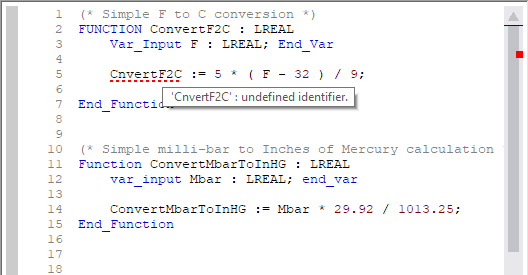
Fernhill SCADA Text Editor Syntax Error Highlighting
Step 3: Correct the Syntax Mistake Identify and fix common problems like missing punctuation, unbalanced brackets, or wrong indentation.
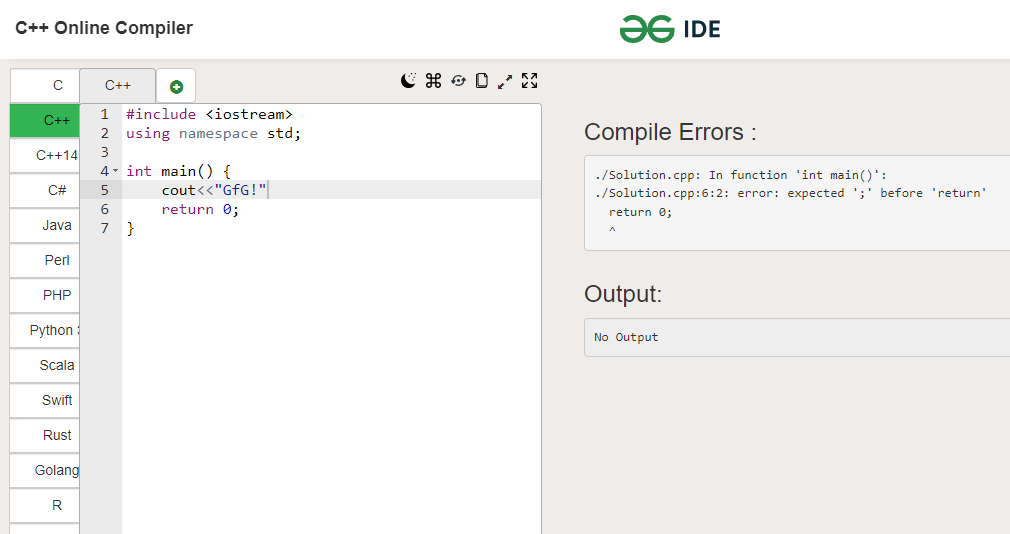
What is a Syntax Error and How to Solve it? – GeeksforGeeks
Step 4: Rerun and Verify Execute the code again to confirm the fix and watch for additional errors.
Resolve Syntax Error in VS Code Terminal When Running Code – YouTube
In a Python script, resolving a missing colon after an if statement allowed the conditional logic to run, processing user input correctly and outputting expected results without interruption. Another instance in JavaScript involved adding a closing curly brace, which fixed the syntax error and enabled a function to load dynamic content on a webpage seamlessly. Finally, correcting a semicolon omission in C++ code compiled the program successfully, boosting performance in a real-time application by eliminating build failures.
